01The instrument
Everything is in view. Read it from the top down.
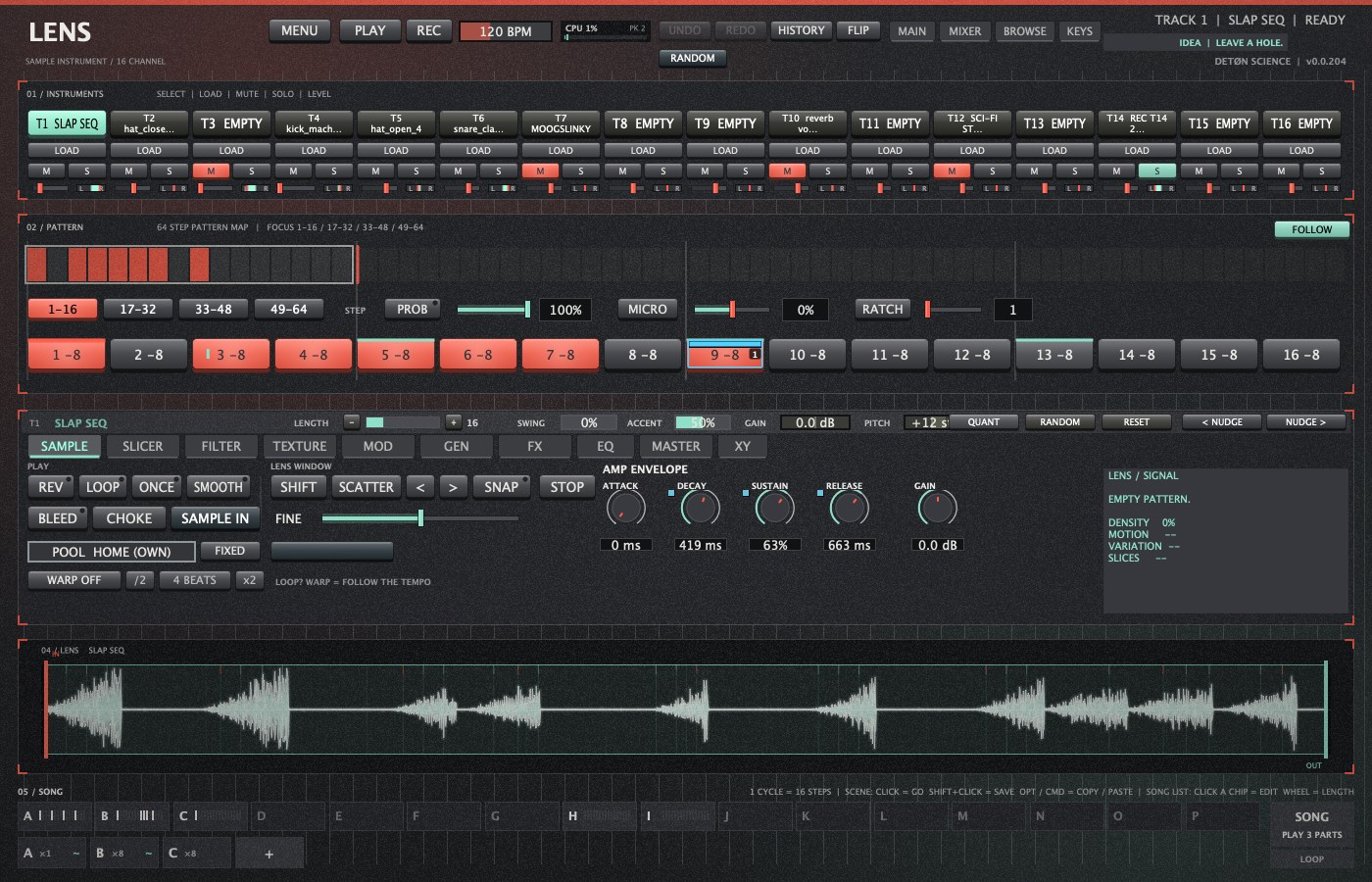
| Area | What it is |
|---|---|
| Top bar | MENU (projects, export, skins, settings), PLAY, REC, tempo, UNDO / REDO / HISTORY, FLIP (the back panel), RANDOM. Views: MAIN, MIXER, BROWSE, KEYS. |
| 01 / Instruments | 16 track pads: click to select, LOAD to browse, M / S to mute and solo. Drop samples straight onto a pad. |
| 02 / Pattern | The 64-step map, page keys 1-16 … 49-64, FOLLOW, and the step tools PROB, MICRO, RATCH. |
| 03 / Track | The header (LENGTH, SWING, ACCENT, GAIN, PITCH, QUANT …) and the pages SAMPLE, SLICER, FILTER, TEXTURE, MOD, GEN, FX, EQ, MASTER, XY. |
| 04 / Lens | The sample: waveform, playhead, the LENS window and the slices. |
| 05 / Song | 16 Scenes (A–P), the song list, SONG and LOOP. |
02First signal
From silence to a loop that moves.
Five minutes.
- BROWSE, pick a folder on the left, click samples to hear them. Drag a kick onto pad T1, a snare onto T2, a hat onto T3.
- MAIN (or Esc). Select T1, click steps 1, 5, 9, 13. T2: steps 5 and 13. T3: every other step.
- Press PLAY, or play your DAW: LENS follows its tempo and transport.
- Drag SWING in the track header for groove. Cmd-click a step for an accent; Option-click to hear just that step.
- Set PROB to 50 %, tap a few hat steps, press PROB again: those hits now play only sometimes. Shorten T3's LENGTH to 12 for a rolling polyrhythm.
- Shift-click Scene A at the bottom to save it. Change the pattern, Shift-click B. Click A and B to switch.
03Steps and locks
Each step can hold more than a hit.
| On a step | Does |
|---|---|
| Click | On / off |
| Cmd-click | Accent |
| Option-click | Hear the step exactly as it plays |
| Shift-click | Lock the knob you last turned to this step |
| Hold | Lock view: every knob shows this step; turn one to lock it |
| Right-click | Step inspector: layers, accent, copy / paste |
Turn PITCH to +7, then Shift-click the steps that should have it: each gets the value and the track goes back to where it was. Nearly everything locks: level, pan, pitch, filter, envelopes, FX, sends, grains, EQ, the slice and even the POOL sample. QUANT pulls a track toward the grid without losing your MICRO feel.
04Shaping a voice
One sound, ten ways of looking at it.
| Page | For |
|---|---|
| SAMPLE | How it plays: REV, LOOP, ONCE, SMOOTH, BLEED, CHOKE groups, the AMP envelope, POOL, WARP and the LENS WINDOW. |
| FILTER | LP / HP / BP, LP24 ladder, CUTOFF, RES, DRIVE and a filter envelope. |
| TEXTURE | GRAIN: the sample as a cloud. |
| MOD | 3 LFOs per track, 4 destinations each, with TEMPLATES and RANDOM. |
| GEN | Euclidean rhythms and MUTATE. |
| FX | 2 inserts (DRIVE, FOLD, LOFI, CHORUS, PHASER, STUTTER, RESONATOR, TAPE STOP …), sends to ECHO and SPACE. |
| EQ | 6 bands on a live spectrum. |
| MASTER | The shared ECHO and SPACE, GLUE / TAPE / TILT, master FX and EQ, the output ceiling. |

05Slice, warp, pool
Cut it. Stretch it. Let it choose.

- Load a loop. SLICER › MODE: GRID (even) or TRANSIENT (on the hits). SLICES › 16.
- Turn some steps on, then FILL STEPS › In order, Shuffle or Reverse.
- Raise RANDOM, REVERSE and GAP a little for a live, glitchy loop.
- WARP (SAMPLE page) keeps a loop on tempo: BEATS for drums, TONES for pads and vocals. Now PITCH changes only the pitch.
- The POOL holds 64 samples per project: CYCLE plays the next one every hit, RANDOM any of them.
06The library
LENS listens to what you give it, and remembers.
In BROWSE, ALL TYPES › KICK shows only kicks in a folder and its subfolders; LENS sorts by listening. SOUNDS saves one track's whole sound; KITS saves all 16 with their samples copied beside them, so a kit travels.
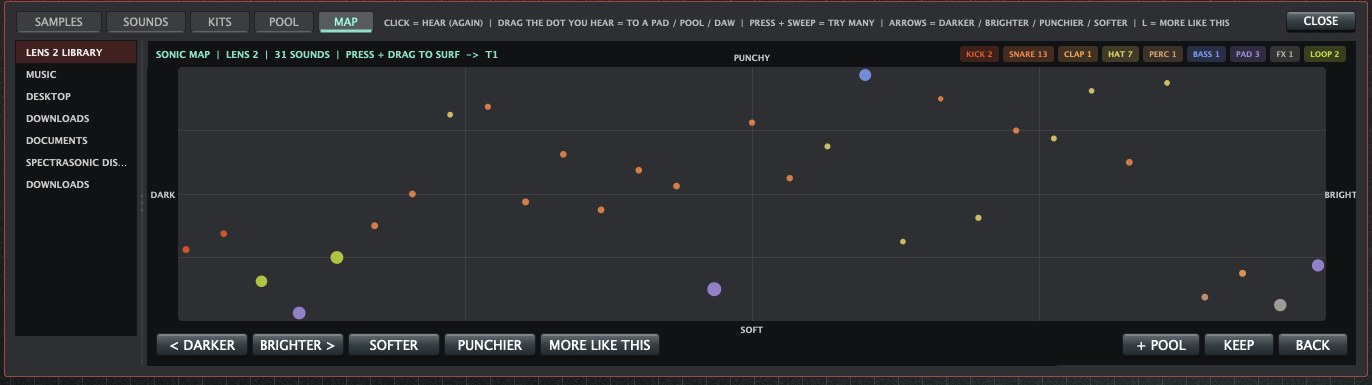
MAP lays a folder out by sound. Click a dot to hear it on the selected track in time; sweep across the map to try many; the arrow keys jump darker, brighter, punchier, softer. Enter keeps it, Esc goes back.
07XY, TRACE, RANDOM
What the hand does can be kept. What chance does can be undone.

- XY: every track has a pad, plus a MASTER pad. Pick a TEMPLATE (FILTER SWEEP, ETCH SQUELCH, FOG ECHO …), drag to move up to four controls. DRIVE moves it by itself in time; touch to take over.
- TRACE: press REC, play, and move any knob. Its movement plays back from then on.
- RANDOM: tick what may change, set AMOUNT, ROLL. ORIGINAL jumps straight back to before you rolled.
08Scenes and song
Moments held still, and the order they return in.
- Save a few Scenes (Shift-click): intro, groove, break, drop.
- In the song list, + adds a part. Click it to pick its Scene, length (1–64 cycles) and how it moves on: CUT or MORPH.
- Press SONG to play the list; LOOP starts over at the end.
- Or SONG REC: arm REC beside LOOP, play the Scene pads by hand, stop. Your take becomes the song.
FLIP shows the back panel: all 16 tracks × 64 steps in one grid, with per-track lengths and MIDI settings.
09Play and record
Play it. Catch what you played. Feed it back in.
KEYS view: SLICES, KEYS (chromatic), SLOTS (the POOL), DRUMS, CHORDS and SCRUB. With REC + PLAY, whatever you play is written into the steps with your timing and accents, and held notes keep their length.
SAMPLE IN records your interface, or resamples LENS itself, onto a track or into the POOL: start NOW, on the NEXT BAR or ON SOUND, free or 1–8 bars.
10Export and your DAW
Everything made here can leave.
- MENU › Export audio: the SONG or a LOOP, with + STEMS (with FX, or dry).
- In a DAW: tempo and transport follow, 272 automatable parameters, 16 track outputs, drag pads out as files.
- MIDI LEARN on any control; Launch Control XL 3 templates; MIDI OUT to Elektron gear or to your DAW's drum rack.
- Autosave every 30 s (MENU › Open an autosave), 50 levels of undo.